Most advocates who use AI already have ChatGPT or Claude open in a tab. Both are capable general assistants. The question we hear from chambers is narrower: for a bail application, a Hindi FIR or a judgment you need to cite tomorrow, which tool needs the least correction before it is safe to rely on?
This article compares the three on the three jobs Indian litigators ask about most: drafting, translation and finding judgments. We make JuniorLawyer, so read it with that in mind. We have tried to describe ChatGPT and Claude fairly, from their own published features as of October 2026, and we do not quote benchmarks we cannot support. If you only want ChatGPT against a legal tool, with a confidentiality checklist, read our ChatGPT for lawyers in India comparison.
The short answer
| Task | ChatGPT | Claude | JuniorLawyer |
|---|---|---|---|
| General writing, rewriting, brainstorming | Excellent | Excellent | Focused on legal drafting |
| Court draft from your case papers | Drafts from what you paste; you format it | Drafts from what you paste; you format it | Template-based draft with placeholders, arguments and reference documents |
| Judgments in a draft | May cite from memory or web search; verify every one | May cite from memory or web search; verify every one | Cases for and against you, each citation linked to its court, paragraph and page |
| Court formatting | Manual | Manual | Page size, margins, font and line spacing carried into PDF and Word |
| Translation in Indian languages | Good for pasted text | Good for pasted text | Whole PDFs, scans and Word files in ten Indian languages, read beside the original |
| Research workflow | Check returned authorities in original sources | Check returned authorities in original sources | AI chat assistance; verify returned authorities in original sources |
None of the three removes your duty to read what you file. The difference is how much of that checking each tool makes quick.
Drafting: where the judgments come from
Take a common task: a regular bail application under Section 483 BNSS for a client arrested on an FIR registered under BNS sections.
In ChatGPT or Claude, you describe the facts or paste the FIR, ask for a draft, and get fluent text quickly. Both handle structure and argument well. Three things then fall to you:
- The citations. If the draft cites judgments, they come from the model's training data or a web search. A case name can be real while the quoted paragraph is not, or the holding can be stated more broadly than the court said it. In 2026 the Supreme Court criticised filings that relied on judgments which did not exist; see what the Court said about AI fake citations.
- The law. Unless you tell it, a general assistant may still reach for Section 437 or 439 CrPC rather than the BNSS provisions. Check each section against the CrPC to BNSS table and the official text of the BNSS on India Code.
- The format. Cause title, margins, font and spacing for your court are set by hand in Word after you copy the text across.
In JuniorLawyer's Quick Draft, the draft starts from a template (here, a regular bail petition) and your reference documents, such as the FIR. Missing facts are left as placeholders to fill, rather than invented. A Judgments tab sorts precedents into cases for you, which support the application, and cases against you, which anticipate what the prosecution may cite.
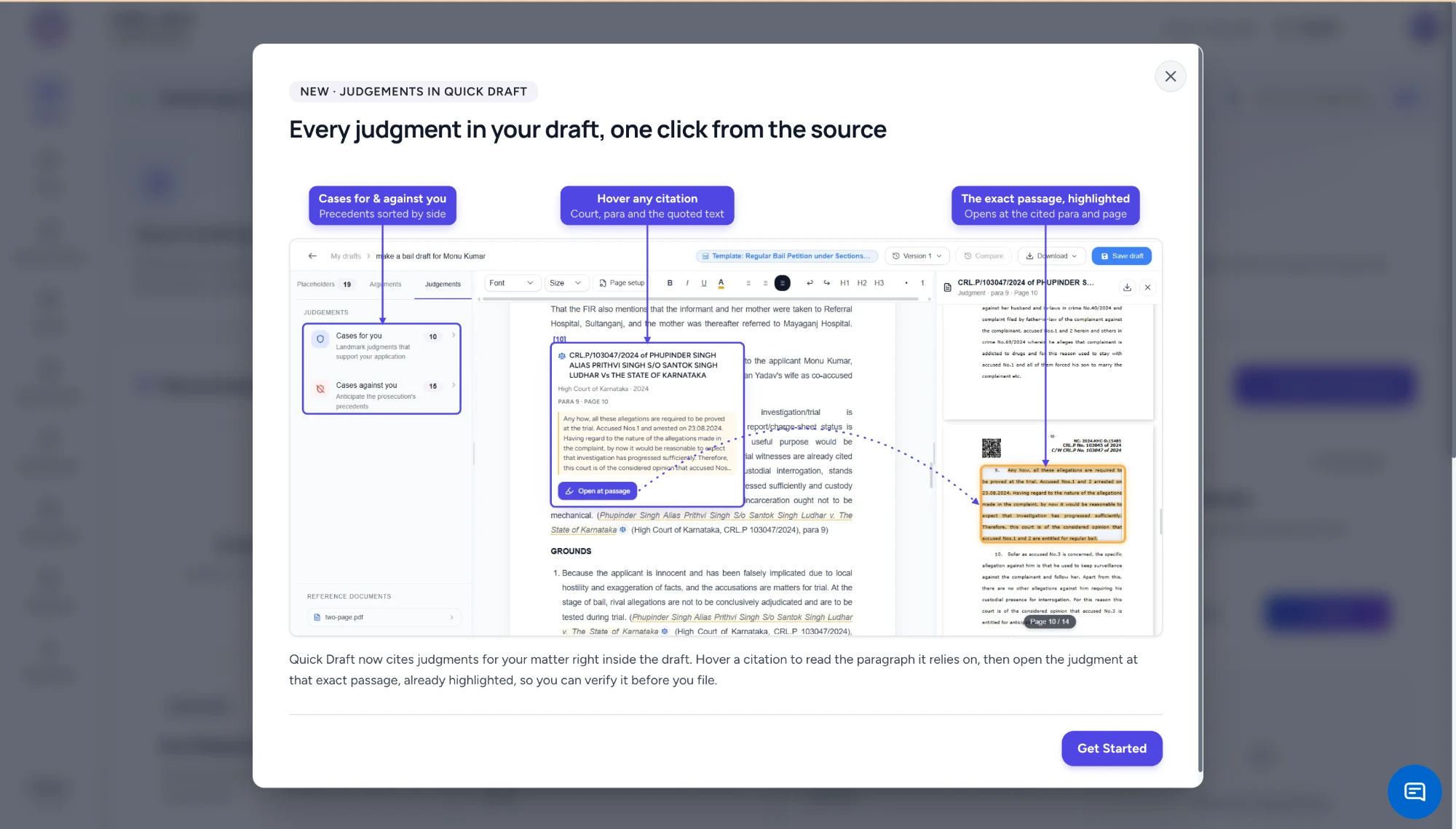
Quick Draft showing a bail draft with a Judgments panel of cases for and against the applicant, a hover card on a High Court of Karnataka citation showing paragraph 9, page 10 and the quoted text, and the judgment PDF open at that passage with the paragraph highlighted
Hover over any citation in the draft and a card shows the court, year, paragraph and page, with the text being relied on. Click Open at passage and the judgment opens beside the draft at that page, with the paragraph highlighted. Checking a citation becomes a ten-second read of the source rather than a separate search.
For example, in the draft above the application relies on a 2024 High Court of Karnataka order. The card shows para 9 on page 10. The highlighted passage confirms that the court granted bail because the allegations were matters for trial and the investigation had progressed. You can see at once whether that holding fits your facts, or whether it should be moved, narrowed or dropped. Our step-by-step guide to drafting with judgment citations for and against you works through the whole petition.
The rest of the editor is built around filing:
- Arguments lists the grounds the draft uses and the additional ones it did not.
- Versions and Compare show what changed between drafts.
- Page setup sets page size, margins, font, font size and line spacing once. It applies to the page in the editor and to the PDF and Word downloads.
- AI chat beside the draft can refine a paragraph, adjust the tone or find further case law, without copying text between tabs.
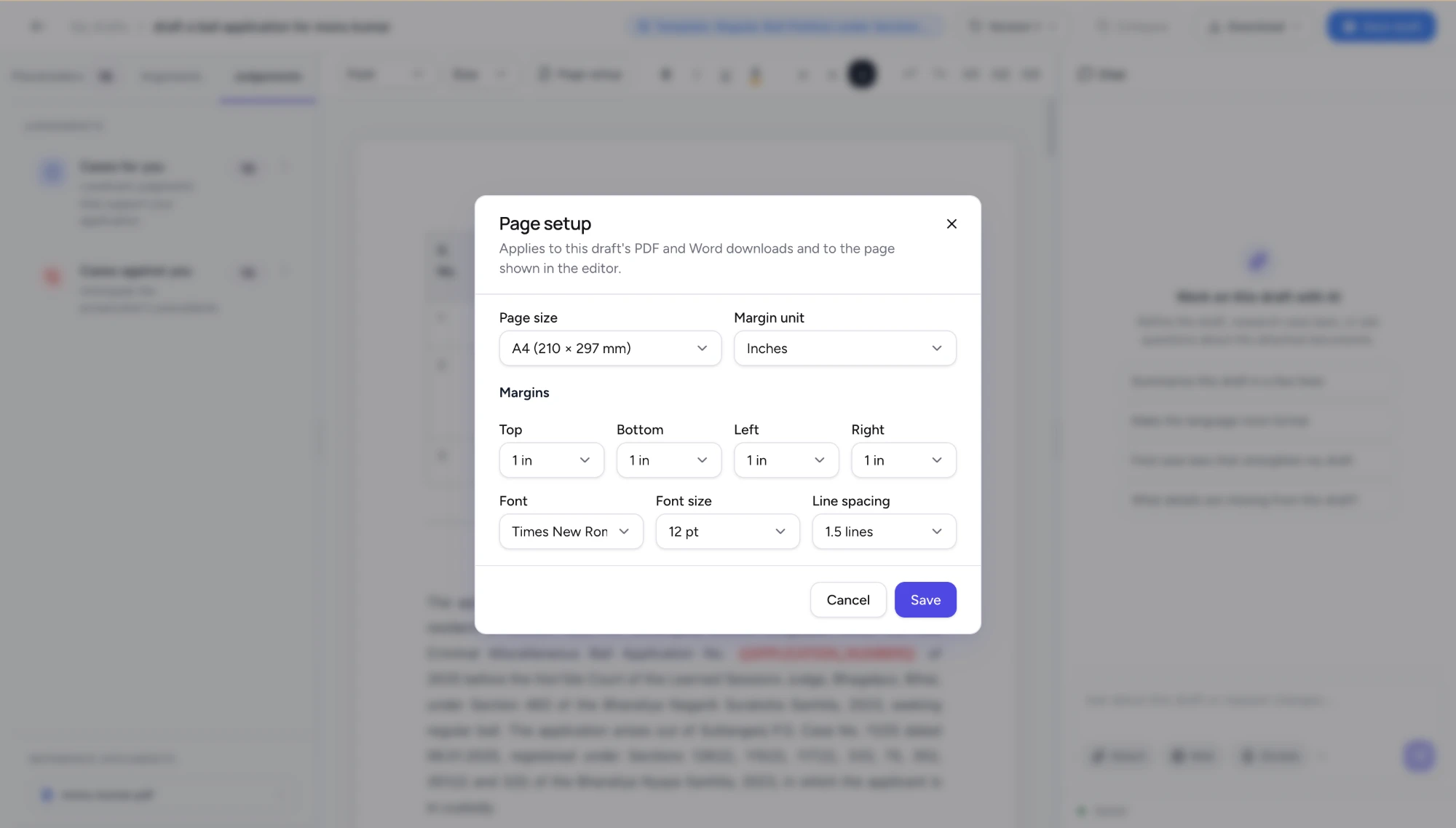
Page setup dialog with A4 page size, one-inch margins, Times New Roman 12 pt and 1.5 line spacing, applying to the draft's PDF and Word downloads
Translation in Indian languages
All three tools translate. The difference is what you can give them and what you get back.
ChatGPT and Claude translate pasted text well, including Hindi, Marathi, Tamil, Bengali and other major Indian languages, and both can read an uploaded PDF. For a long, scanned or handwritten record, accuracy depends on how well the text was extracted first, and the output is plain text that you lay out yourself.
JuniorLawyer treats translation as a document task. You upload a PDF, Word file or image, including a scanned or handwritten FIR. OCR extracts the text, which is then translated between English and Hindi, Marathi, Gujarati, Bengali, Punjabi, Urdu, Kannada, Tamil, Telugu or Malayalam. The result can be read beside the original and downloaded as PDF or Word.
A typical use is a Hindi FIR for a matter argued in English before a High Court. Translate the FIR, keep the original open beside it, and check names, dates, sections and the operative allegations line by line before relying on it. If your court requires a certified or verified translation for filing, the machine translation is your working copy, not the filed one. Our guide on choosing a legal translation service covers when human certification is needed, and our guide to translating court records in Indian languages has a review checklist for Marathi, Tamil, Kannada and other records.
Judgments: ask a question and check the source
This is where the tools differ most.
ChatGPT and Claude do not include a library of Indian judgments. They answer from what they learned in training or, with web search on, from pages they find. That is useful for orientation, but you then need to locate the judgment on an official source and check that it says what the answer claims.
JuniorLawyer provides research assistance through AI chat. Describe the point you need to investigate and request supporting authorities and source links. When an answer supplies a judgment link or paragraph reference, open the original and check what the passage supports.
The current workflow does not include a standalone judgment library with subject, judge and year filters or most-cited sorting. For original decisions, use official court sources or another research service that meets your coverage and search requirements. See the Supreme Court judgment research and source-checking guide for a worked exercise.
Where ChatGPT and Claude are the better choice
A legal tool is not the answer to every task. ChatGPT and Claude are often better for:
- thinking through a novel argument or a hard question of strategy;
- non-court writing such as articles, client newsletters and firm policies;
- explaining an order to a client in plain language;
- work outside Indian litigation, or with documents a legal tool was not built for.
Many advocates use a general assistant and a legal tool, for different jobs.
How to decide on your own work
Run the same anonymised matter through each tool. A bail application from a recent FIR works well, and our 20-minute comparison test gives you a scoring sheet. Score each output on four things: the correct BNSS and BNS sections, facts taken only from the record, citations you could verify in under a minute, and the minutes needed before the draft is ready to file.
Before you paste anything into any AI tool, JuniorLawyer included, remove client names and identifying details. Then check how the provider stores, retains and trains on your data.
You can create a free JuniorLawyer account and run that test on Quick Draft, translation and AI chat. The plans and allowances are on the pricing page.