It is the evening before a bail hearing in the High Court. Your client was arrested ten weeks ago, the chargesheet has been filed, and you have an hour to settle the petition.
The AI draft in front of you cites three judgments. Each looks right. The question is whether you would stand up and read paragraph 9 of any of them to the Bench without first opening it.
This article is about that hour. It walks through AI drafting with judgment citations using a real bail draft in JuniorLawyer's Quick Draft: how precedents are sorted into cases for and against your client, how each citation is traced to its paragraph and page, and how the draft is formatted for filing. It also covers what no tool does for you.
If you want an overview of the drafting tool itself, read our Quick Draft guide. For a comparison with general assistants, see ChatGPT vs Claude vs JuniorLawyer.
The worked example: a regular bail petition
The demo matter is a regular bail application for an applicant, Monu Kumar, under Section 483 of the Bharatiya Nagarik Suraksha Sanhita, 2023 (corresponding to Section 439 CrPC). Section 483 concerns the special bail powers of the High Court and Court of Session.
Section 480 (corresponding to Section 437 CrPC) addresses non-bailable offences before a court other than the High Court or Court of Session, including the Magistrate. Section 482 concerns anticipatory bail.
Do not select the procedural code from the arrest date alone. The BNSS commenced on 1 July 2024, but Section 531(2)(a) preserves the CrPC for specified appeals, applications, trials, inquiries and investigations pending immediately before commencement.
Check the proceeding's history, the savings provision, applicable decisions and any special statute before choosing the provision for the actual application.
Read the official BNSS text, including Sections 480, 482, 483 and 531. Our bail application format under BNSS covers the structure in detail.
Step 1: Start from a template and the record
Quick Draft starts from a template, here Regular Bail Petition, and the reference documents you upload, such as the FIR. Where a fact is not in the record (date of arrest, custody period, previous bail applications), the draft leaves a placeholder instead of guessing.
A counter shows how many are still unfilled. Fill each one from the case file, not from memory.
Step 2: Read the Arguments tab
The Arguments tab separates the grounds the draft already uses from new ones it has not used. In bail work that might be parity, custody period or completion of investigation. Decide which grounds suit your facts before you look at the authorities; a judgment should support a ground, not invent one.
Step 3: Sort the cases for and against you
The Judgments tab divides precedents into two lists:
- Cases for you: judgments that support the application.
- Cases against you: judgments the prosecution is likely to cite, so you can answer them in the petition or at the hearing.
Each entry shows the court and year. Judgments already cited in the draft are listed separately from additional ones not yet used, and a What the Court held note sets out the key paragraphs read from the full judgment.
In the screenshot below, the panel shows ten cases for the applicant and fifteen against. A petition that ignores the adverse line of authority invites the Public Prosecutor to raise it first.
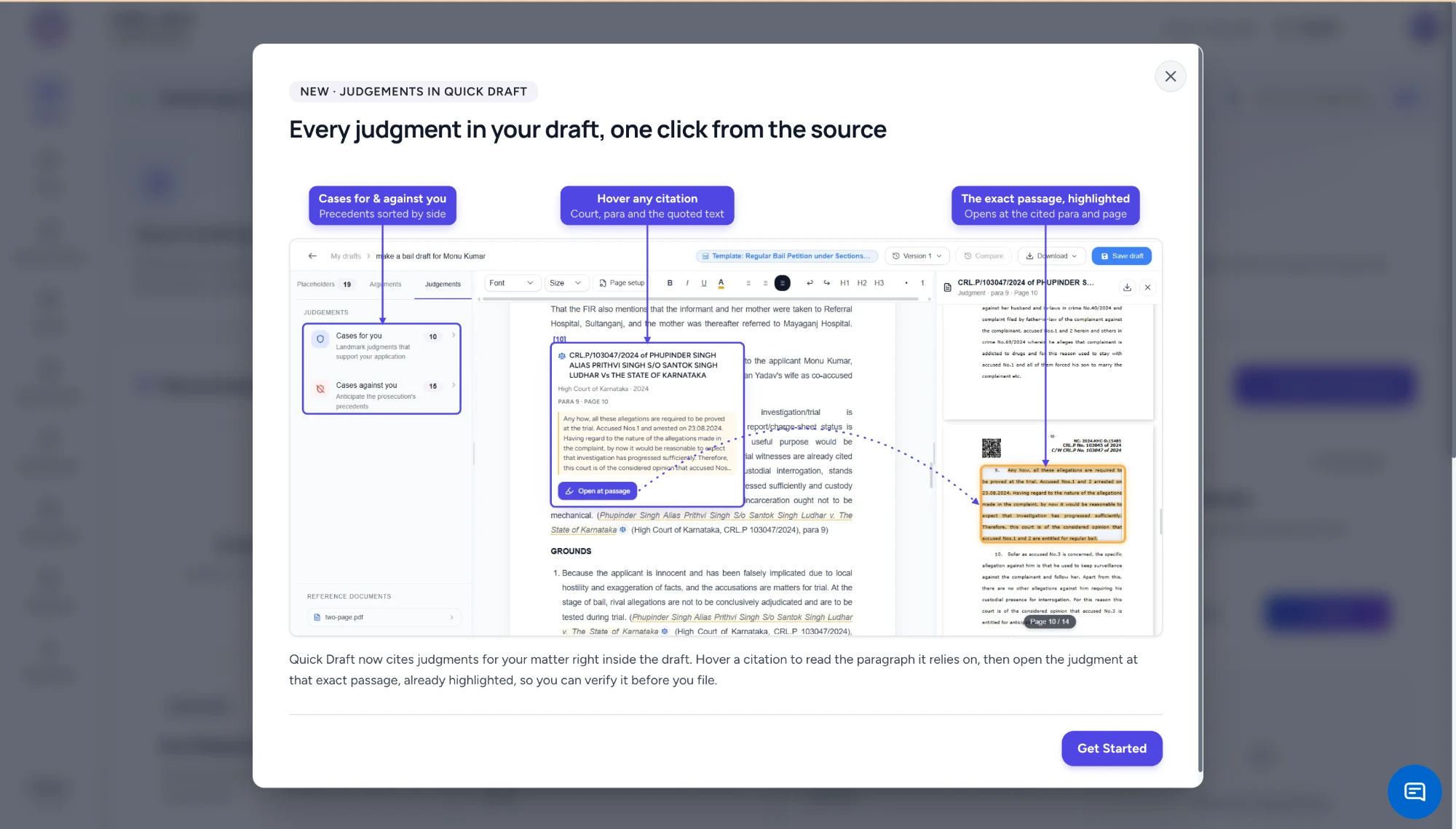
Quick Draft bail petition with the Judgments panel listing cases for you and cases against you, a hover card on a High Court of Karnataka citation showing paragraph 9 and page 10 with the quoted passage, and the judgment PDF open beside the draft with that paragraph highlighted
Step 4: Trace each citation to its paragraph
Hover over a citation in the draft and a card appears with the case title, court, year, paragraph, page and the passage the draft relies on. In the example, the draft cites CRL.P/103047/2024, Phupinder Singh alias Prithvi Singh S/o Santok Singh Ludhar v. The State of Karnataka, High Court of Karnataka, 2024, at para 9, page 10.
Click Open at passage and the judgment PDF opens beside the draft at page 10, with para 9 highlighted. In substance, the court held that the allegations were matters to be proved at trial, that accused 1 and 2 had been arrested on 23.08.2024, that the investigation had progressed sufficiently, and that they were therefore entitled to regular bail.
Step 5: Decide whether it fits your client
This is the step only you can do.
The Karnataka order helps if your client has been in custody for a comparable period and the investigation is complete or nearly so. It helps less if the investigation is at an early stage, if recovery is pending from your client, or if the offence carries a statutory bar on bail.
Read the paragraphs before and after para 9 for the facts the court weighed. Then decide whether to keep the citation, narrow the proposition it is cited for, or drop it.
Good and bad citations: what to look for
An AI tool can link a citation to the right page and still have chosen a poor precedent. These are the problems to look for when you check judgments cited in an AI draft.
The paragraph records an argument, not a holding. Many judgments begin by setting out each side's submissions. A sentence such as "learned counsel submits that the accused is entitled to bail" in para 4 is not what the court decided.
Look for the operative reasoning, usually after "we have considered" or "in view of the above".
The facts are different in a way that matters. A bail order in a property offence with a three-year maximum does not carry much weight in an NDPS commercial-quantity case, where Section 37 of the NDPS Act imposes its own twin conditions. Compare the offence, the length of custody, the stage of trial and the role attributed to the accused.
A later judgment has overruled or explained it. A 2019 High Court order may have been set aside on appeal, or a later Supreme Court ruling may have narrowed the principle. Search for later references on the eCourts judgments portal and the Supreme Court website.
Coordinate bench versus larger bench. A single-judge order binds the subordinate courts in that State. Another single judge who disagrees with it should refer the question to a larger bench rather than ignore it, and it yields to a Division Bench decision on the same point.
If the case against you comes from a larger bench, address it directly rather than citing a smaller one around it.
The proposition is stated more broadly than the court said. A draft might cite a case for "bail is the rule" when the paragraph says something narrower about undertrial custody. Make the sentence in your petition match the paragraph.
A citation checklist before you file
| Check | What to look for | Where |
|---|---|---|
| Source | Case title, court, year and case number match the judgment itself | Hover card and the PDF's first page |
| Paragraph | The cited paragraph says what your petition claims | Open at passage |
| Holding | It is the court's finding, not a submission it recorded | The reasoning section of the judgment |
| Facts | Offence, custody period and stage of investigation are comparable | Facts paragraphs before the holding |
| Bench | Whether it binds your court or is only persuasive | Bench strength on the first page |
| Later law | Not overruled, set aside or narrowed | eCourts and Supreme Court search |
| Adverse cases | You have answered the strongest case against you | Cases against you list |
For a bail petition citing two or three authorities, this does not take long, and it is the part of the work you cannot delegate. For a wider approach to verifying citations from any AI tool, see our guide to citation verification in legal AI.
Refining the draft with the AI chat
A chat panel beside the draft, Work on this draft with AI, can refine wording, answer questions about the draft and find further case law. It is useful for short, specific requests: "rewrite para 6 to rely only on the custody period", or "find a judgment where bail was granted after the chargesheet was filed in a similar offence". Any judgment it suggests goes through the same checklist as the rest.
Version and Compare show what changed between drafts, which helps when a senior has marked up the petition and you want to see exactly which grounds moved.
Court formatting and downloads
Before downloading, open Page setup. Set the page size (A4, 210 by 297 mm), margins in inches (one inch on each side in the example), font (Times New Roman), font size (12 pt) and line spacing (1.5 lines). The dialog notes that these settings apply to the draft's PDF and Word downloads and to the page shown in the editor, so what you see while drafting is what prints.
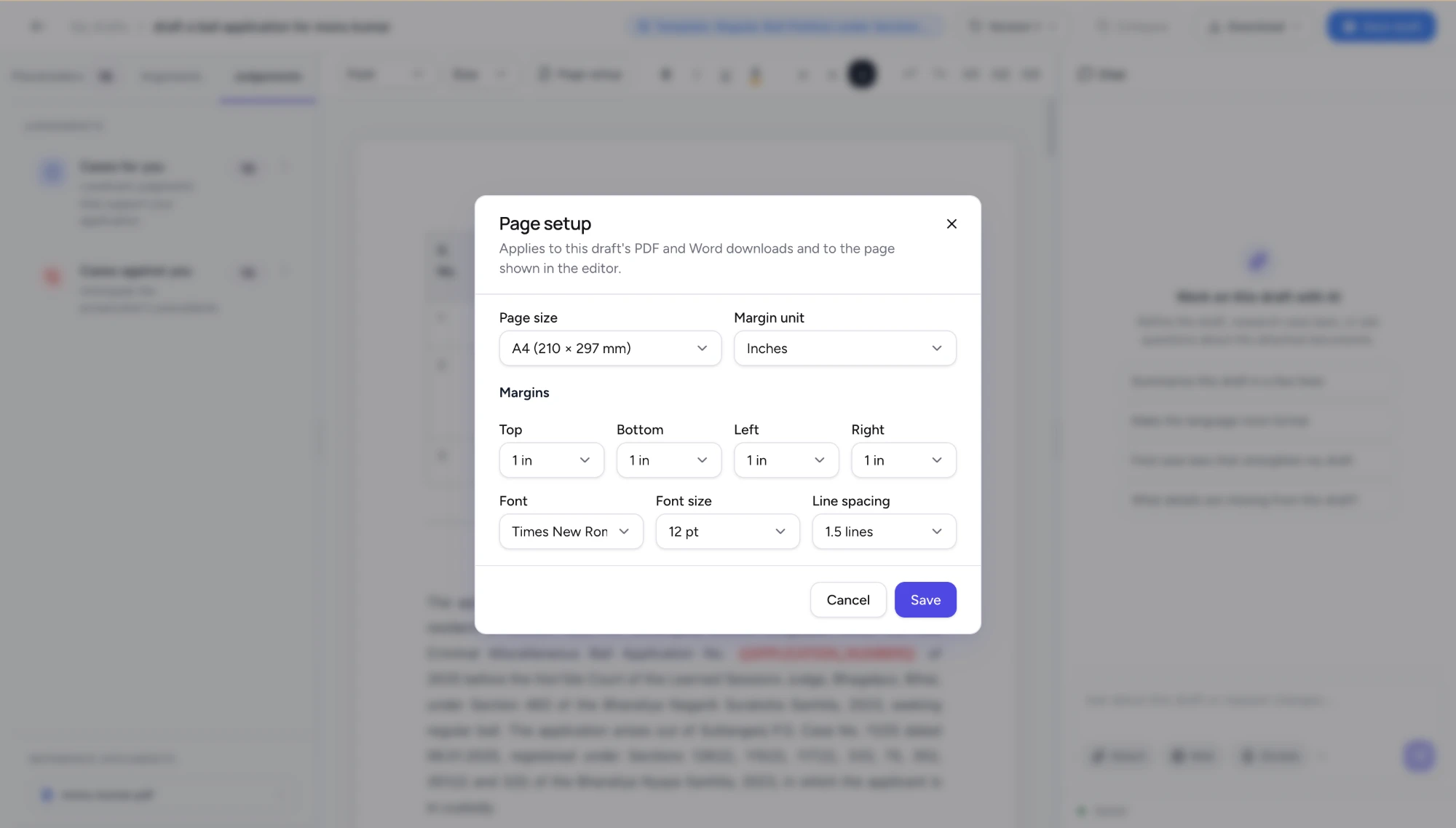
Page setup dialog for a draft showing A4 page size, one-inch top, bottom, left and right margins, Times New Roman at 12 pt and 1.5 line spacing, applying to PDF and Word downloads and the editor page
Rules on paper size, margins and spacing differ between High Courts and change from time to time, so confirm them against your court's current rules or practice directions. Save draft keeps your work. Download as Word if you expect further changes in chambers, or as PDF for e-filing.
What the tool does not do
Linked citations make checking faster. They do not make it optional.
- You still read the judgment. The hover card shows one paragraph. The case may turn on facts set out three pages earlier.
- The tool can choose a distinguishable precedent. Sorting a case under "for you" is a starting point, not a conclusion that it helps your client.
- Later developments may not be reflected. Search for subsequent judgments yourself before the hearing.
- The judgment of what to argue is yours. Which grounds to lead with, and which authorities to leave out, depends on the Bench, the prosecution and your client.
If you would like to try this on an anonymised matter, create a free account and start a regular bail petition from the template. Plans and allowances are on the pricing page.