In India's highly fragmented and multilingual legal landscape, litigation advocates, corporate law firms, and legal departments routinely confront a major operational bottleneck: documents written in languages they do not read, speak, or write fluently. An First Information Report (FIR) filed in Marathi in Mumbai, a detailed chargesheet drafted in Kannada in Bengaluru, a witness deposition recorded in Bengali in Kolkata, or a trial court decree issued in Tamil in Chennai—these are not rare anomalies; they are everyday realities for legal practitioners handling cross-state litigation, corporate compliance, and criminal defense.
To address this challenge, JuniorLawyer has engineered an AI-powered document translation system specifically trained on Indian legal data. Achieving an impressive legal translation accuracy 90 percent range (typically 85% to 90% depending on the source document's legibility), and featuring format preserving document translation, it stands out as the best legal document translation tool and the premier advocate document translation tool in the country. Whether you need to translate FIR Hindi to English online, perform complex Hindi to English legal translation, or execute a Telugu to English court order translation, JuniorLawyer delivers court-ready translations in seconds.
This guide provides a comprehensive, expert-level analysis of how to translate legal documents in India, the statutory and constitutional language requirements of different courts, the pitfalls of generic consumer translators, and a step-by-step guide to using JuniorLawyer's advanced translation interface to optimize your legal workflows.
---
The Legal and Constitutional Framework: Why Legal Document Translation India is Essential
To understand why professional legal document translation India is so critical, one must examine the linguistic division built into the Indian judicial system.
1. The High Courts and Supreme Court (English-Centric)
Under Article 348(1) of the Constitution of India, all proceedings in the Supreme Court and in every High Court must be conducted in the English language. This is the case unless the Governor of a State, with the previous consent of the President, authorizes the use of Hindi or any other official language for proceedings in that specific High Court (as has been done in states like Uttar Pradesh, Bihar, Rajasthan, and Madhya Pradesh for oral arguments and certain decrees).
However, even in those High Courts, when matters are appealed or reviewed, or when records are sent to the Supreme Court of India, all regional-language pleadings, annexures, depositions, and lower court judgments must be translated into English.
2. The District and Sessions Courts (Regional Languages)
Under Section 272 of the Code of Criminal Procedure, 1973 (and its modern successor, Section 311 of the Bharatiya Nagarik Suraksha Sanhita, 2026 / BNSS), the State Government determines what language shall be the language of each court within the State, other than the High Court. As a result:
- In Maharashtra, trial courts heavily use Marathi for filings, depositions, and orders. - In Karnataka, trial courts record evidence and pass orders in Kannada. - In Tamil Nadu, Tamil is the primary language of the subordinate judiciary. - Throughout the Hindi belt (Uttar Pradesh, Bihar, Madhya Pradesh, Rajasthan, Haryana, Delhi), District Courts operate almost entirely in Hindi.
The Chasm for Litigation Advocates
When a defense lawyer in Delhi is briefed to argue a bail application or an appeal before the High Court of Karnataka or the High Court of Madras, they are immediately confronted with a regional-language case file. They must quickly:
- Translate FIR to English to understand the exact allegations.
- Translate chargesheet Hindi to English or from Kannada/Tamil to English to identify contradictions in witness statements.
- Translate court order online to draft grounds of appeal.
- Translate application to English to understand what interim relief was requested in the lower court.
Without an accurate legal translation India workflow, advocates are forced to rely on expensive, slow translation agencies, which can take days to return a single document, jeopardizing urgent bail hearings and filing timelines.
---
Why Generic Translation Tools Fail for Legal Work
Many advocates initially turn to generic web engines when searching for the best website to translate legal documents. However, tools like Google Translate or DeepL are trained on generic web texts (news articles, blogs, conversations) and consistently fail when applied to legal documents for several reasons:
1. Inability to Process Specialized Legal Terminology
Generic tools translate words literally rather than contextually. In Indian legal practice, regional documents are filled with Urdu, Persian, and vernacular legal terms. For instance:
- "Zamanat" (Urdu/Hindi) is translated by generic tools as "assurance" or "guarantee," whereas the correct legal term is "bail."
- "Muddayi" or "Fariyadi" is translated as "complainant" or "prosecutrix," but generic tools often confuse them with "plaintiff" or "accused."
- "Aarop Patra" (Hindi) translates literally to "allegation letter," but legally represents a "chargesheet."
- "Vakalatnama" is translated as "power of attorney" or completely mistranslated as a "document of advocacy."
- "Fard" or "Panchnama" (seizure memo / spot memo) is frequently turned into gibberish by consumer translation engines.
JuniorLawyer is specifically trained on Indian legal corpora, meaning it recognizes these terms and translates them into their proper English legal equivalents.
2. Zero Format Preservation
A trial court order or chargesheet is not a continuous block of plain text. It contains:
- Cause Titles (court name, parties, case number).
- Tabular Data (seizure lists, witness tables, property descriptions).
- Numbered Paragraphs and nested clauses.
- Signatures, seals, and dates at the bottom.
If you paste a legal PDF into a generic translator, it strips away the layout, outputting a jumbled block of text. You then have to spend hours reformatting the document. JuniorLawyer is a format preserving document translation tool that outputs translated text in the exact layout, tables, and spacing of the original file, making it immediately court-ready.
3. Lack of OCR Integration for Scanned & Handwritten Documents
The vast majority of regional court documents—especially FIRs and police diaries—are scanned PDFs or photos of handwritten sheets. Generic translation engines cannot translate an image file without separate OCR processing.
JuniorLawyer combines OCR translation legal documents into a single workflow. It runs a proprietary, legal-focused OCR model to extract text from handwritten FIRs and scanned chargesheets, and then feeds it directly into the translation engine.
---
Feature Comparison: JuniorLawyer vs. Generic Translators & Legal Research Databases
The table below highlights how JuniorLawyer compares with generic search engines and traditional Indian legal databases:
| Feature / Capability | Google Translate / DeepL | Traditional Databases (Manupatra, CaseMine) | JuniorLawyer AI Translation | | :--- | :--- | :--- | :--- |
| Primary Focus | General consumer text translation | Judgment research & citation tracking | End-to-end legal drafting & translation |
| Legal Terminology Accuracy | 60% - 70% (Literal, non-legal) | N/A (No translation tools) | 85% - 90% (Legal context-aware) |
| Indian Languages (10+) | Basic support, low legal accuracy | None | All 10+ major Indian languages |
| Format Preservation | None (Raw text dump) | N/A | Full layout, table & list preservation |
| Handwritten OCR + Translate | No | No | Yes (Handwritten FIRs & police diaries) |
| Side-by-Side Split View | No | N/A | Yes (Source on Left, Translation on Right) |
| Downloadable Output | No (Copy-paste only) | N/A | Yes (Download as court-ready PDF or DOCX) |
| Integration | Standalone web tool | Research database | Directly linked to Case Files & AI Drafting |
---
All Indian Languages Supported
JuniorLawyer supports bidirectional translation across all major languages used in Indian courts, enabling seamless collaboration for nationwide litigation:
* Hindi to English legal translation: Crucial for Sessions Court filings, FIRs, and chargesheets across North India.
* Tamil to English legal translation: Essential for practicing before the Madras High Court when lower court records are in Tamil.
* Telugu to English court order translation: Used extensively by advocates in Andhra Pradesh and Telangana.
* Kannada legal translation: Essential for appellate filings in the Karnataka High Court.
* Malayalam court order translation: Supporting legal practitioners handling appeals in the Kerala High Court.
* Marathi legal document translation: Translating police files, agreements, and trial decrees from Maharashtra.
* Gujarati to English legal translation: High-demand translation for corporate matters and local litigation in Gujarat.
* Bengali to English FIR translation: Critical for criminal matters in West Bengal and Tripura.
* Punjabi legal translation online: Streamlining document review for Punjab and Haryana court matters.
Whether you are performing court document translation Hindi English or translating from English into any regional language to explain a case status to a client, JuniorLawyer handles it.
---
Step-by-Step Guide: How to Translate Legal Documents on JuniorLawyer
JuniorLawyer has simplified the translation workflow so that any advocate, legal intern, or corporate counsel can translate a document in under a minute. Here is the step-by-step process:
Step 1: Log in to the JuniorLawyer Workspace
Navigate to juniorlawyer.in and enter your credentials. If you do not have an account, you can register for a trial to translate legal documents online free during your evaluation.
Step 2: Go to the "Documents" Tab & Upload Your File
From the left-hand navigation sidebar, click on the "Documents" tab. This is your secure cloud repository. To upload a new file, click the purple "Upload Documents" button at the top-right of the dashboard.
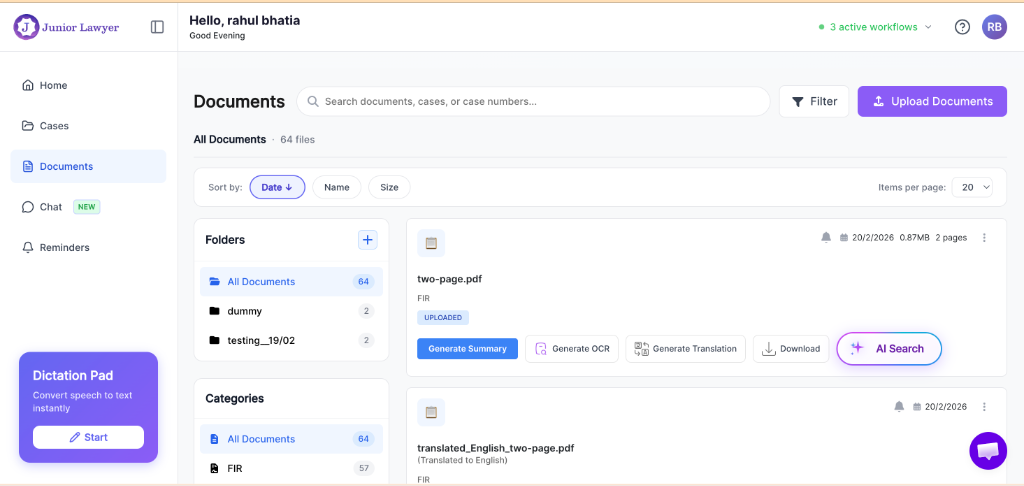
Documents screen showing the Upload Documents button and document list with Generate Translation option
Step 3: Configure File Details in the Modal
A modal dialog will appear. Fill out the following:
- Select Case (Optional): Associate this document with an active case folder in your system for organized billing and tracking.
- Document Type (Required): Classify the document (e.g., FIR, Chargesheet, Court Order, Evidence, Application). This classification helps the AI optimize its OCR and legal translation style.
- Upload File: Drag and drop your PDF, DOCX, or image file (JPG, PNG, JPEG).
Click "Upload Documents" to save the file.
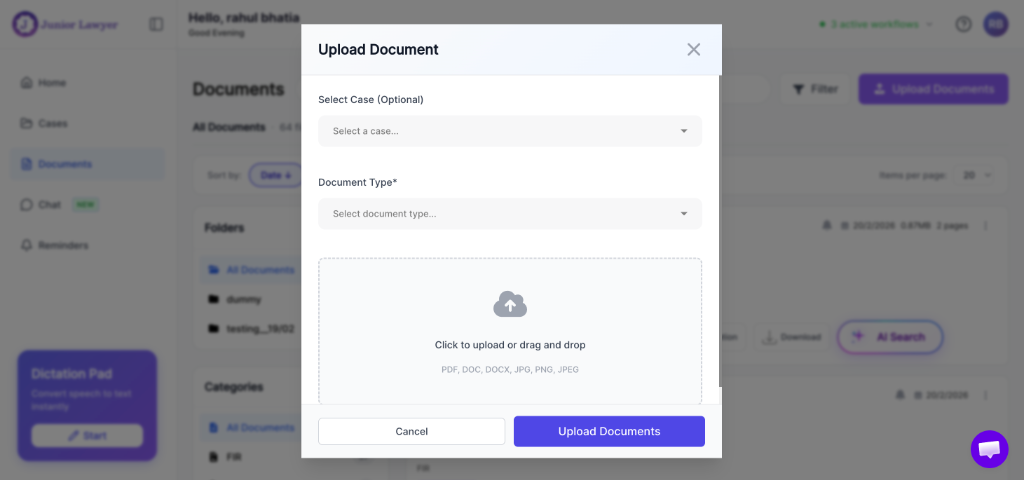
Upload Document modal showing case selection dropdown, document type selector, and file upload area
Step 4: Click "Generate Translation" & Choose Your Language
Find the newly uploaded document in your dashboard list. Click the "Generate Translation" button on the document card. A configuration popup will appear where you can:
- Select your target language (e.g., English, Hindi, Kannada, Tamil, Telugu, Malayalam, Marathi, Gujarati, Bengali, Punjabi). - Select the output format (PDF or editable DOCX).
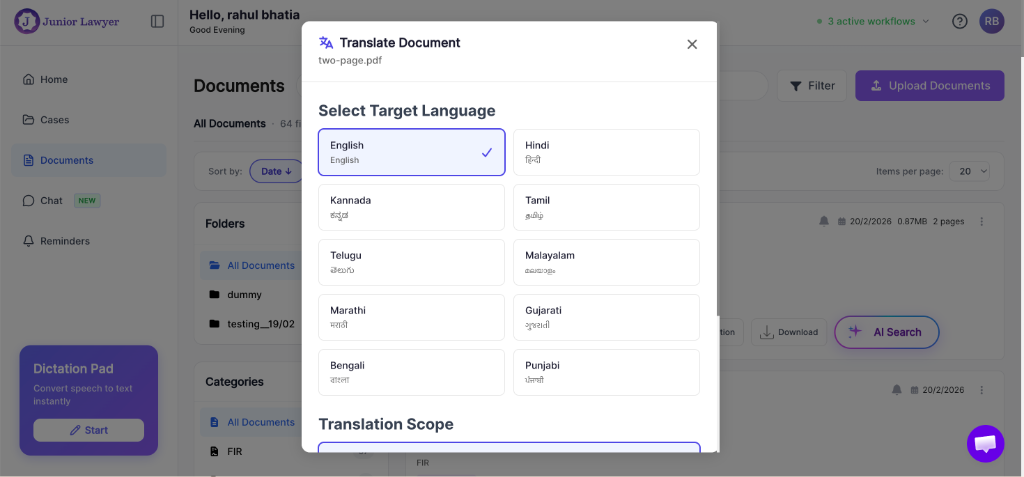
Translation popup showing language selection grid with English, Hindi, Kannada, Tamil, Telugu, Malayalam, Marathi, Gujarati, Bengali, and Punjabi options
Click "Translate". The AI powered legal translation tool will process the file, running OCR if needed, and finalize the translation in 5 to 20 seconds (depending on document length).
Step 5: View and Compare Side-by-Side
Once processing completes, click the green "View/Download Translation" button on the document card.
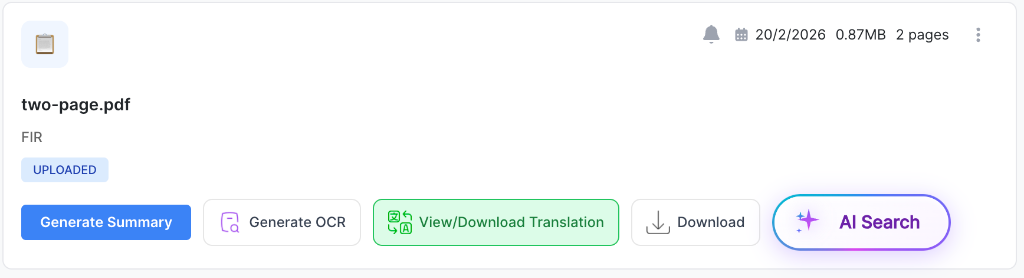
Document card showing the green View/Download Translation button alongside other action buttons
This launches the side by side document translation view:
- The Left Panel displays your original source document.
- The Right Panel displays the translated document.
You can toggle between Split View, Original Only, or Translation Only. Once satisfied, click the download button to download translated legal document PDF DOCX files directly to your device.
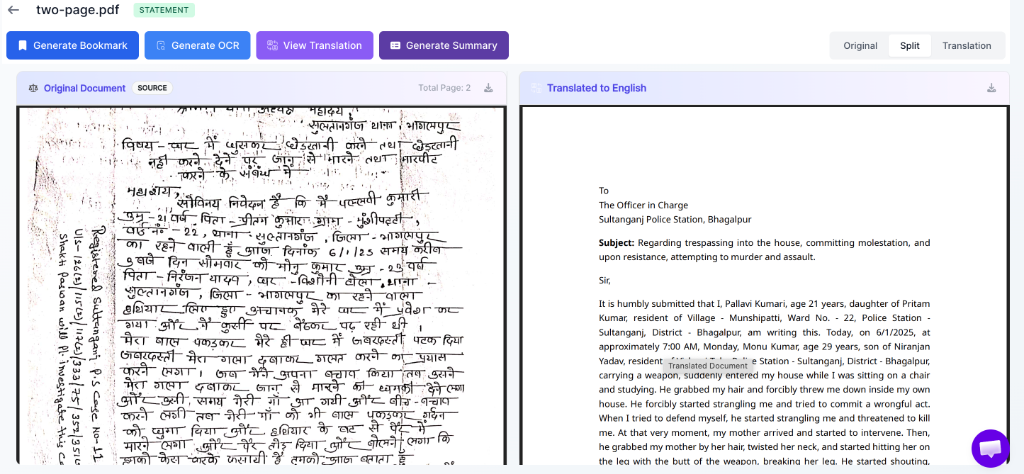
Side-by-side split view showing original Hindi handwritten FIR on the left and its accurately translated English version on the right
---
Advanced Capabilities: OCR and Handwritten Text Translation
One of the biggest hurdles in multilingual legal translation India is the prevalence of handwritten documents. Traditional OCR tools fail because:
- Police writing in FIRs and police diaries is often scribbled quickly. - Photocopies of old trial court documents are low-contrast and faded. - Regional scripts like Tamil, Telugu, and Kannada have complex ligatures that standard OCR cannot read.
JuniorLawyer uses a hybrid model:
1. Intelligent Pre-processing: The document is cleaned digitally, enhancing contrast, reducing background noise, and straightening skewed lines.
2. Legal-Trained OCR: The system identifies regional scripts, including handwritten annotations.
3. Contextual Text Extraction: The OCR outputs raw text while predicting words based on standard legal phrasing (e.g., matching standard penal code section numbers like Section 302 IPC / Section 103 BNS).
4. AI Translation: The extracted text is translated with high-level legal accuracy.
This makes it the most robust legal translation software for real-world court documents.
---
Best Practices for Advocates Using AI Legal Translation
While JuniorLawyer offers a legal translation accuracy 90 percent standard, advocates must remember that AI is a tool designed to assist, not replace, human legal expertise. To maintain the highest professional standards, advocates should adhere to the following best practices:
- Verify Names and Dates: Always cross-verify proper nouns (names of parties, police officers, witnesses, villages) and critical dates against the original document, as OCR engines can occasionally mistake characters in poorly scanned papers.
- Check Specific Section Citations: Ensure that statutory sections (e.g., Section 420 IPC / Section 318 BNS) are accurately represented.
- Understand the Evidentiary Rules: Under the Indian Evidence Act, 1872 (now Bharatiya Sakshya Adhiniyam, 2026 / BSA), when presenting translated documents as evidence in court, you must verify the translation. If the court requires a certified translation, the AI-translated document serves as an excellent draft that can be finalized and signed off by an authorized translator, saving massive translation costs and hours of manual drafting.
- Maintain Client Confidentiality: When using any legal translation software India 2026, ensure that your platform has a clear privacy policy. JuniorLawyer does not use your uploaded confidential legal documents to train public AI models, ensuring that advocate-client privilege is protected.
---
Conclusion: Upgrading to a Digital Chamber
In a multilingual country like India, the ability to read, understand, and draft legal documents in multiple languages is a significant competitive advantage. Relying on slow manual translation or inaccurate generic tools is no longer necessary.
By adopting a dedicated legal document translation app for lawyers like JuniorLawyer, advocates can translate statement to English online, convert handwritten FIRs, and review complex chargesheets in seconds. This saves hours of administrative work, allowing lawyers to focus on strategy, arguments, and client consultation.
Step into the future of Indian legal practice. Try the AI powered legal translation tool and experience format-preserved, highly accurate translations today.